Using Ansys Scripting with pyMAPDL, pyDPF-Post, and More – PART 1: Running and Post-Processing an Ansys Model Outside Ansys

Using Ansys Scripting with pyMAPDL, pyDPF-Post, and More - PART 1: Running and Post-Processing an Ansys Model Outside Ansys
Categories:
One of the Python scripts created using Ansys Scripting

Using the Ansys Scripting API to Execute an Ansys MAPDL Solve and Post Process the Results in Python

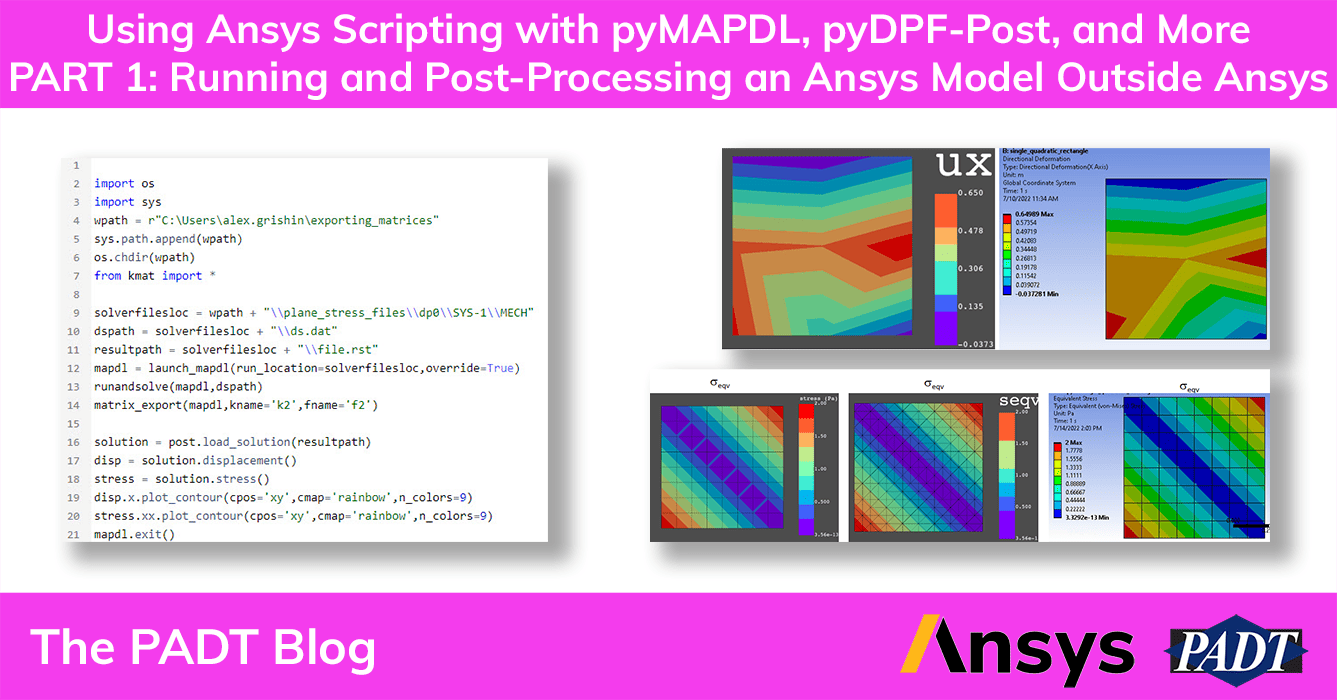
PADT’s Alex Grishin has been busy doing some cool Multiphysics optimization work. As part of that effort, he used Ansys scripting to:

  1. Build models in Ansys Mechanical
  2. Programmatically control solving the model in Ansys MAPDL
  3. Extract the stiffness matrix and load vectors
  4. Post-process the displacement and stress solution in Python

First, he shares how to install pyansys from github.com. Then Alex uses a NAFEMS challenge problem to show how to do all of this, including increasingly more accurate ways to script the post-processing. Along the way he uses Ansys API tools pyMAPDL to access the Ansys MAPDL solver, and pyDPF to interface with the Ansys toolset, including extracting the results.

The Results on the Left Were Created with Ansys Scripting in Python

Please find a PDF of his tutorial here:

And here is a zip file with the Scripts and the Ansys Mechanical database archive he used:

Alex is working on some additional tutorials on scripting in Python with this incredibly powerful Ansys API. And don’t forget, if you are interested in having PADT help your Ansys scripting, contact us and let’s talk.

The Two Results on the Left Were Created with Ansys Scripting in Python

Get Your Ansys Products & Support from the Engineers who Contribute to this Blog.

Technical Expertise to Enable your Additive Manufacturing Success.

Share this post:

Upcoming Events

Apr 21
, 2026
Reduce Component Weight in Demanding Service Conditions - Webinar
Apr 22
, 2026
Certification by Analysis for Propulsion Systems: Building Confidence through Modeling, Uncertainty, and Credibility - Webinar
Apr 22
, 2026
Modeling a Pressurized Water Reactor in Flownex - Webinar
Apr 22
, 2026
Ansys 2026 R1: Ansys Discovery What’s New
Apr 23
, 2026
Access the Right Material Data Directly Inside Your Simulation Workflow - Webinar
Apr 23
, 2026
Ansys 2026 R1: Ansys Digital Twin What’s New
Apr 27
- Apr 30
, 2026
Nuclear and Emerging Technologies for Space (NETS) 2026
Apr 28
, 2026
Uncertainty Quantification for Real‑World Model Deployment in Industrial Systems - Webinar
Apr 28
, 2026
Ansys 2026 R1: Ansys Sherlock and Electronics Reliability What’s New
Apr 29
, 2026
Ansys 2026 R1: Structural Mechanics What’s New
Apr 30
, 2026
Ansys 2026 R1: What’s New in Ansys Optics
May 07
, 2026
Ansys 2026 R1: Ansys LS-DYNA What's New
May 13
, 2026
2026 Arizona Manufacturing Showcase
Jun 18
, 2026
E-Mobility and Clean Energy Summit
Jul 15
, 2026
Arizona Aerospace Summit
Aug 10
- Aug 11
, 2026
2026 CEO Leadership Retreat + Golf Tournament
Oct 21
, 2026
2026 Southern Arizona Tech + Business Expo
Nov 18
, 2026
2026 Governor’s Celebration of Innovation

Contact Us

Most of our customers receive their support over the phone or via email. Customers who are close by can also set up a face-to-face appointment with one of our engineers.

For most locations, simply contact us: