In two previous entries we introduced CFX Expression Language, CEL:
Part 1: Accessing CFD Simulation Information in CFX (and FLUENT)
Part 2: Augmenting Material Property Assignments in ANSYS CFX
In this third installment we will see how to use CEL to apply boundary conditions as equations rather than constant values. For example, if a non-constant velocity profile can be defined as an equation, we can use CEL to define as well as apply the profile.
Let’s look at an example in which the velocity profile is a function of y coordinate:
u(y) = 6 * Umax * y / H * (1 – y/H) (m/s)
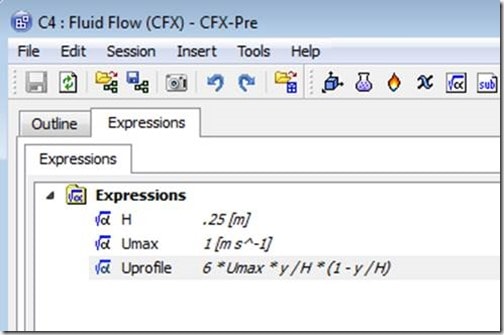
Using the procedure we learned in part 1 of this series, in CFX Pre we have defined expressions for H and Umax. We then defined the equation for the velocity profile as Uprofile:
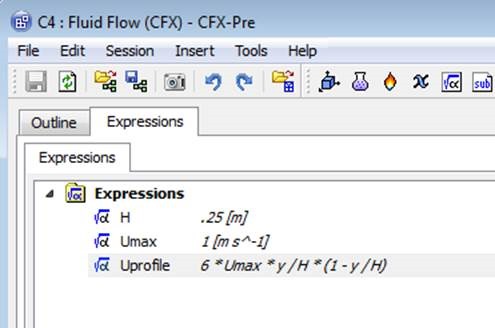
Next we go to the Plot tab within the Expressions editor to verify that our velocity profile matches expectations:

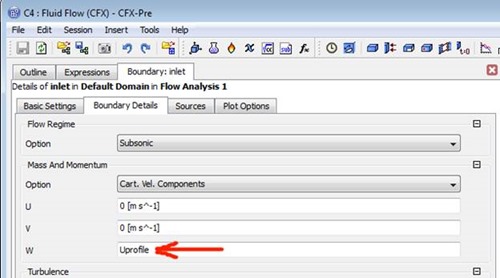
To use our new expression in CFX Pre, we just enter the expression name in the appropriate field when defining the inlet velocity:
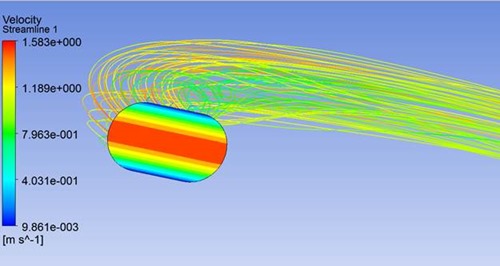
Finally, this velocity plot from CFD Post shows that indeed our desired velocity profile was applied at the inlet.
Hopefully this demonstrates how easy it can be to use CFX Expressions to define non-constant boundary conditions. In the next part of the series, we will look at using expressions to ramp or step apply loads.